One Community
Customizable Recipe Build-Out Tool
The Recipe Build-Out Tool is a core component of our open-source and replicable model for sustainable living. This tool is designed to streamline and optimize the process of meal planning for large groups, making it easier to adapt recipes to suit diverse dietary preferences, nutritional needs, and/or regional fresh food availability. By leveraging a simple and intuitive spreadsheet system, the Recipe Build-Out Tool empowers communities to create balanced, delicious, and resource-efficient meals. When combined with our food bars, the recipes included in this tool will have you eating like you have your own personal chef and nutritionist, serving the most nutritious and fresh food possible. Whether you’re cooking for a small family or a large, self-sustaining group, this tool offers flexible solutions to help ensure food variety and self-sufficiency while minimizing food waste and packaging.
For easy navigation, this page contains the following sections:
- What Is The Recipe Build Out Tool
- Explore the Recipes
- Learn More About the Food Self-Sufficiency Plan
- Why Create A Recipe Build-Out Tool
- Ways you can contribute to this
- Key consultants to this component
- Why Choose Open Source Solutions
- How the Recipe Build-Out Tool Works
- Resources
- Summary
- FAQ
RELATED PAGES (click individual icons for complete pages)






CLICK THESE ICONS TO JOIN US THROUGH SOCIAL MEDIA


WHAT IS THE RECIPE BUILD-OUT TOOL
By incorporating data from the food preferences and ingredient availability, this tool adjusts recipes to suit the specific needs of the community/users, ensuring optimal nutrition and variety. Whether you’re cooking for 5 people or 50, this tool simplifies the process by providing clear, adaptable recipes that are easy to follow. To help users get started, we provide detailed tutorials on how to use the Recipe Build-Out Tool. These tutorials cover everything from initial setup to customizing recipes based on specific dietary needs.
EXPLORE THE RECIPES
Click the buttons below to view or download the recipes.

LEARN MORE ABOUT THE FOOD SELF-SUFFICIENCY PLAN
A Food Self-sufficiency Transition Plan provides a specific road map for groups of 25-50+ people to buy and prepare delicious, healthy, and affordable food while establishing the necessary infrastructure to produce their own food.
WHY CREATE A RECIPE BUILD-OUT TOOL
The Recipe Build-Out Tool is a comprehensive resource designed to streamline meal planning and preparation. It helps communities create sustainable, healthy, and delicious meals for a wide range of dietary preferences. We’ll open source all the updates, modifications/clarifications, and learnings from our experience applying this as we construct the 3-dome cluster as part of our crowdfunding campaign. Then we’ll further evolve it through building the complete Earthbag Village (Pod 1) and Duplicable City Center, and then even more through building the other 6 villages.
WAYS TO CONTRIBUTE TO EVOLVING THIS SUSTAINABILITY COMPONENT WITH US
SUGGESTIONS | CONSULTING | MEMBERSHIP | OTHER OPTIONS
CLICK THESE ICONS TO JOIN US THROUGH SOCIAL MEDIA
RESEARCHERS FOR THIS COMPONENT:
Chelsea Mariah Stellmach: Project Manager
Tyson Den-Herder: Educator and Electrical Engineer
WHY CHOOSE OPEN SOURCE SOLUTIONS
Open-source solutions that promote sustainability and self-sufficiency. The Recipe Build-Out Tool supports this mission by enabling anyone, anywhere to create adaptable, efficient, and sustainable meal plans. It integrates with our broader food self-sufficiency plan, helping communities reach food security by empowering individuals with the knowledge and tools needed for responsible food management.
HOW THE RECIPE BUILD-OUT TOOL WORKS
 The Recipe Build-Out Tool is a comprehensive resource designed to streamline meal planning and preparation. It helps communities create sustainable, healthy, and delicious meals for a wide range of dietary preferences. By incorporating data from the food preferences and ingredient availability, this tool adjusts recipes to suit the specific needs of the community or group, providing optimal nutrition and variety. Whether you’re cooking for 5 people or 50, this tool simplifies the process by providing clear, adaptable recipes that are easy to follow.
To help users get started, we provide detailed tutorials on how to use the Recipe Build-Out Tool. These tutorials cover everything from initial setup to customizing recipes based on specific dietary needs.
Getting Started With The Recipe Build-Out Tool
How to Use the Master Recipe Tab
Master Recipe Tab Explained
Master Food Costs Tab Explained
VnO Multipliers Tab Explained
GETTING STARTED WITH THE RECIPE BUILD-OUT TOOL
This section is designed to help you get started with our powerful and flexible recipe planning system. Whether you’re managing a small kitchen team or organizing large-scale meal prep, this section will teach you how to use the tool we’ve built to streamline your workflow, create shopping lists, and customize/modify our recipes to suit your own needs via the following steps:
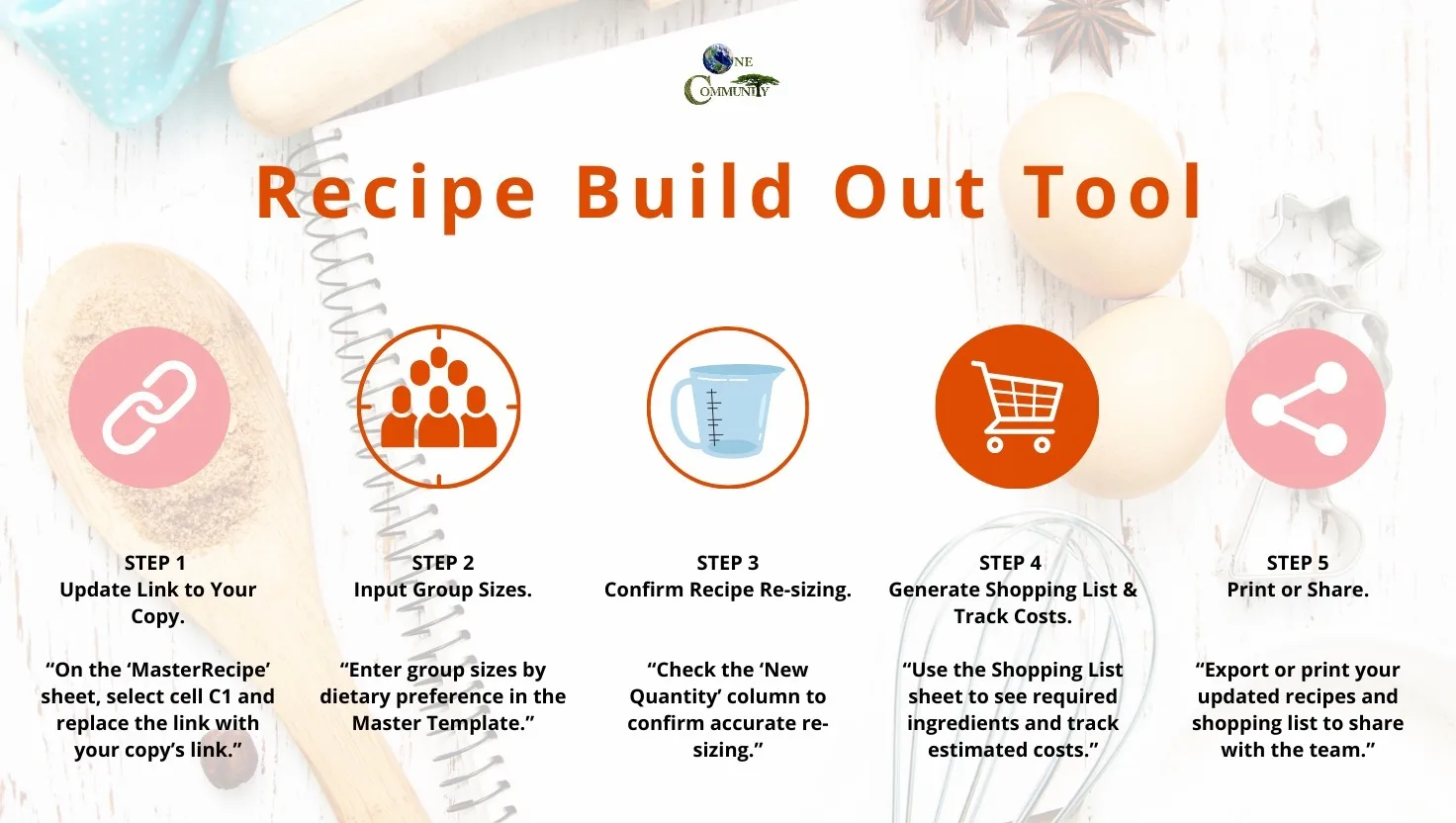
Recipe Build Out Tool summary – Click to enlarge
HOW TO USE THE MASTER RECIPE TAB
This tutorial is designed to support three types of users, each with different levels of experience, needs, and goals. Typical Users are looking for a ready-to-use solution and can implement the tool with minimal adjustments. Adaptors need to make minor ingredient changes based on regional availability or personal preference, but still rely on the tool’s built-in structure. Customizers want to modify or replace recipes entirely and require a deeper understanding of the system’s logic and functionality. Each section of the tutorial corresponds to one of these user types, providing step-by-step guidance that matches their level of customization. Whether you’re using the tool as-is or rebuilding it for a specific context, this tutorial will help you navigate and implement it effectively.
TYPICAL USERS – USING THE TOOL AS-IS
Typical users will use the recipe tool out of the box. They will copy the master and recipe pages, reconnect them, and enter basic details like the number of people in their group. The tool is already set up for common food preference types, so no major edits are needed. The recipe pages offer 2 months’ worth of pre-entered recipes, ready to go. Once the master is connected, changes made there, such as adjusting the number of people, will update everything automatically. This group does not need to modify ingredients or equations and can begin using the system with minimal setup.
This approach is effective for users seeking a ready-to-use solution that requires no customization. It works well for individuals or families living in the United States who have access to the listed ingredients and align with the dietary categories already included. These users benefit from the extensive work done by recipe developers and engineers who designed the system to be both sustainable and nutritionally balanced. Because of this foundation, users can easily scale recipes and full meal plans to match their household size and dietary needs without having to rework calculations or menu structure. The system reflects over a thousand hours of development, allowing typical users to implement a complete, practical solution with confidence and ease.
ADAPTORS – MAKING MINOR ADJUSTMENTS
Adaptors will also use the recipe tool out of the box, but need to make minor adjustments based on their local context. Like typical users, they begin by copying the master and recipe pages, reconnecting them, and entering the number of people in their group. However, they may not have access to all the listed ingredients or may need to make small changes to better fit regional availability or personal preference. They will learn how to make these changes on the master sheet, such as swapping out one ingredient for another, so that the rest of the tool continues to function as designed. The tutorial content for this group will explain how to make these changes without breaking the structure or calculations in the tool.
This setup is useful for people outside the United States or those with dietary restrictions that require substitutions. These users benefit from the system’s flexibility, which allows them to make specific updates while still relying on the structure, logic, and nutrition planning developed by the original team. Because the tool updates from the master, users in this group can still make changes in one place and have them reflected throughout the entire system. The design makes it possible to adjust individual ingredients while preserving the integrity of the meal plans and nutrition goals established by the development team.
CUSTOMIZERS – REBUILDING OR REPLACING RECIPES
Customizers will make major changes to the recipe tool. Like the others, they will start by copying and reconnecting the master and recipe pages. However, instead of only changing a few ingredients, these users may want to replace staple foods or build their own recipes entirely. They will need to understand how the tool works in more detail, including the logic behind the recipe structure, the shopping cycles, and how fresh and staple foods are balanced across weeks. The tutorial for this group will explain the foundational concepts of the system and guide users through making deeper edits without breaking key formulas or functionality.
This group includes users with very different regional ingredients, cultural food preferences, larger budgets, or a desire to make the system their own. They benefit from the flexible structure created by the development team, which allows for deep customization while still offering a stable framework for organizing meals, scaling recipes, and maintaining nutritional balance. While this group requires more effort to use the tool effectively, the system provides the guidance and structure needed to support that level of customization.
INSTRUCTIONS FOR ALL USERS
All users will begin by making a copy of the Recipe Build-Out Tool, then update the link on each page, enter in the dietary preferences of your group, and verify that the calculated quantities look correct. Detailed instructions below, and here’s a graphic summary:
How to use the Recipe Build-Out Tool. Detailed instructions below.
Here’s a video tutorial also:


UPCOMING VIDEOS: THE RECIPE BUILD OUT TOOL FOR TYPICAL USERS
SEE OUR HOW TO HELP AND/OR CROWDFUNDING CAMPAIGN PAGE TO HELP CREATE ALL THE TUTORIAL VIDEOS FASTER
INPUT GROUP SIZES
Enter the number of people in each dietary preference group (e.g., Vegans, Omnivores, etc.) in the Number in Group columns on the VnOMultipliers tab of your copy of the Master Recipe Template.
Warning: Do not edit any cells other than those specified in this tutorial, as that may result in malfunction of the entire Recipe Build Out Tool. For most users, you should only edit the number of people in each group on the VnOMultipliers tab and the link in cell C1 for other tabs.
ADJUST RECIPES FOR GROUP SIZE
In the Re-size the Recipe columns, let the sheet automatically adjust the ingredient quantities. You do not need to manually calculate the amounts.
TRACK AND ESTIMATE COSTS
Use the Cost per Unit and Estimated Total columns to track the cost of ingredients. This helps you keep an eye on your budget and estimate the cost of meals for the entire group. These numbers are derived from the MasterFoodCosts tab.
APPLY SEASONAL SUBSTITUTIONS
Use the Seasonal Substitute columns to replace ingredients with seasonal alternatives. This ensures the recipes are tailored to what is available and affordable in your area. Eating locally and seasonally supports sustainable agriculture, reduces the carbon footprint associated with long-distance food transportation, and ensures fresher, more nutrient-dense produce while supporting local economies.
GENERATE THE SHOPPING LIST
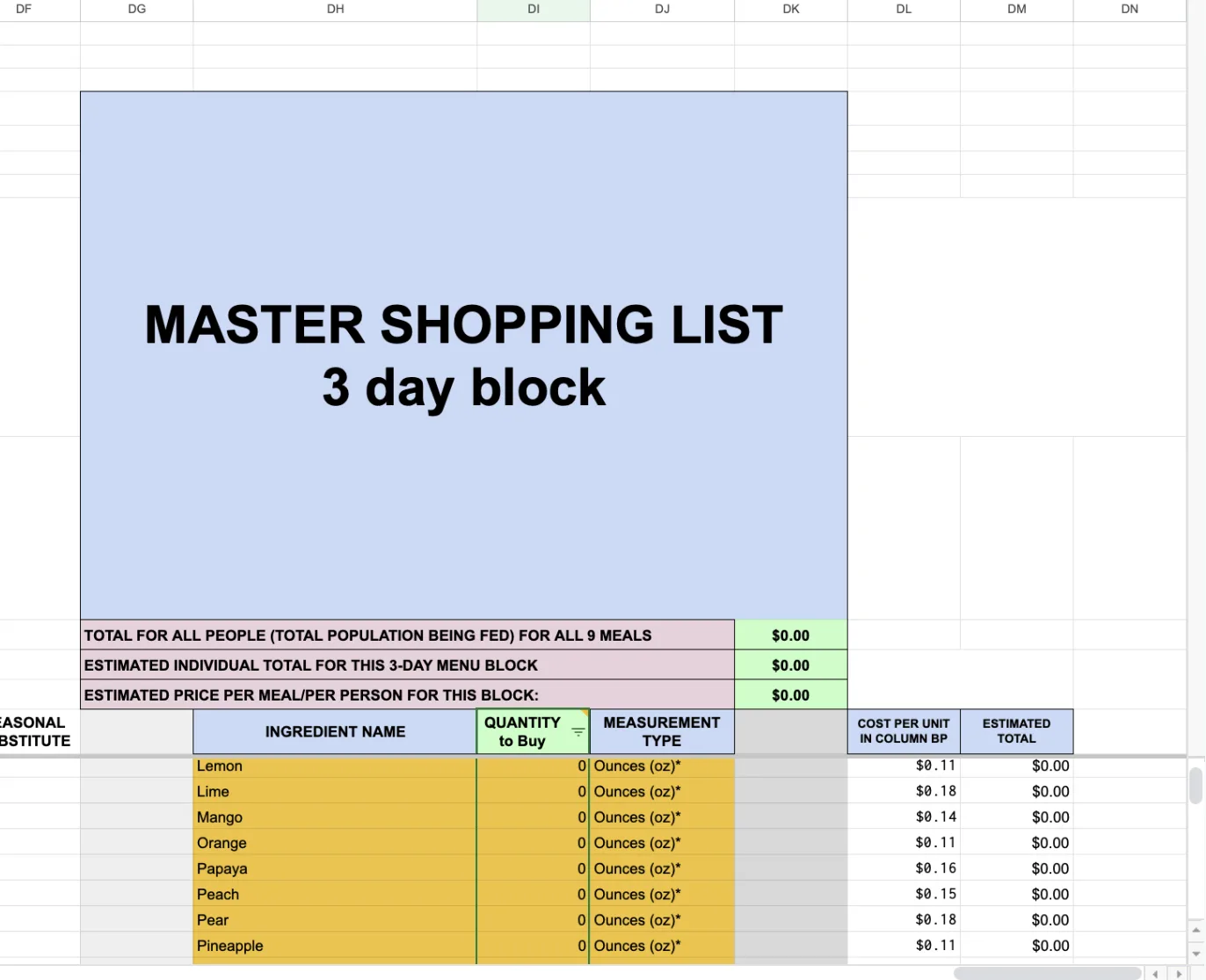
Master 3 Day Shopping List
Scroll to the far right side of the MasterRecipe Tab to find the Master Shopping List. The Master Shopping List provides an intuitive calculation tool that dynamically adjusts the quantities of ingredients needed for your shopping list based on the recipes you choose and the number of servings you plan to prepare. This feature ensures that you have the precise amount of each ingredient required, streamlining your shopping experience.
Once all recipes are sized and adjustments are made, use the filter in cell DI15 to generate a master shopping list that excludes zero or blank values. This will condense all the ingredients needed across all recipes and help you purchase only what’s necessary.
SAVE OR PRINT YOUR CUSTOM MENU
Save menus or shopping lists in the format of your choice, or print pages to access anywhere.
OPEN THE MASTER RECIPE TEMPLATE
To begin, please click on the link to access the Master Recipe Template; it is crucial to open this template in a compatible spreadsheet program, such as Google Sheets (preferred) or Excel, to fully leverage its built-in features
- These features, including automated calculations, are designed to enhance your recipe management efficiency.
- Having the appropriate program established and ready will optimize your experience.
CREATE A COPY OF THE MASTER RECIPE TEMPLATE.
Click on the link, and then the “Make a copy” button. Ensure that “GOOD MasterRecipe to Duplicate”, “MasterFoodCosts”, and “VnOMultipliers” sheets are connected to your Master Recipe Template copy.
UPDATE LINKS IN THE FOLLOWING CELLS OF YOUR COPY TO ENSURE FUNCTIONALITY.
It’s really important to update your links in these areas or the spreadsheet will not work properly.
- Link content in “VnOMultipliers” sheet to “GOOD MasterRecipe to Duplicate” sheet by copying the link of your copy of the “MASTER RECIPE TEMPLATE FOR 3-DAY BLOCKS” (with “VnOMultipliers” sheet).
- On the “MasterRecipe” sheet, select cell C1 and replace the link with the new link to your copy.
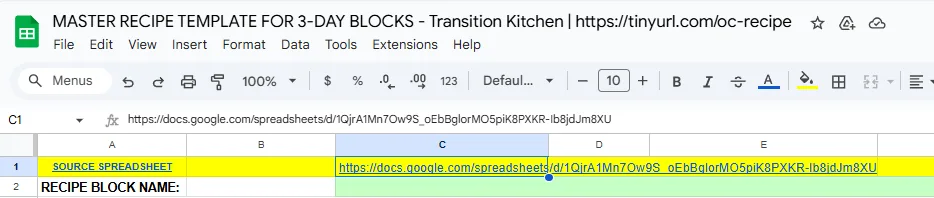
MasterRecipe Tab
TAKE THE TIME TO THOROUGHLY UNDERSTAND THE LAYOUT OF THE TEMPLATE.
The template is organized into several essential sections, each designed to serve a specific purpose and facilitate your workflow.
- To help you navigate the template more effectively and make the most of its features, please view the brief description of the components below.
- Note: It is important to note that when you are inserting information into the cells on the sheet, make sure to insert them in the formula bar. This is for organizational and aesthetic reasons.
MASTER RECIPE TAB EXPLAINED
The MasterRecipe tab is designed to manage and scale multiple recipes for different dietary preferences, track ingredient quantities, and estimate the total cost of ingredients for a meal plan. It helps you organize and adjust recipes for various groups, from vegans to omnivores, while providing a detailed breakdown of ingredient quantities, substitutions, and costs.
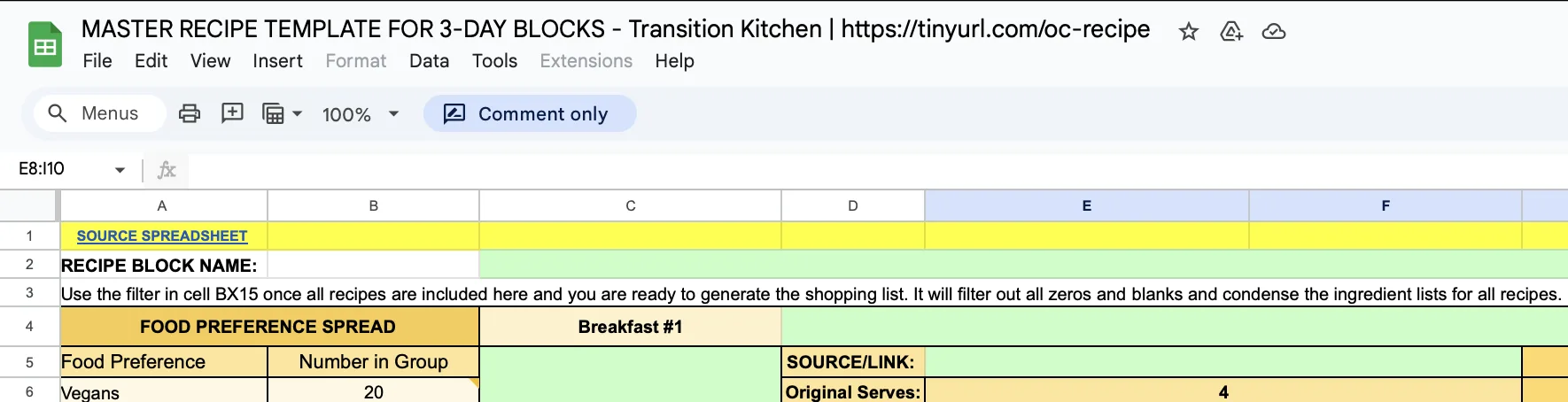
RECIPE BLOCK NAME
At the top of the sheet, you will find the Recipe Block Name. This section identifies the specific recipe block being worked on.
- NOTE: It reminds users not to edit permanent cells in the first recipe block, as changes will affect all blocks and linked tabs.
RECIPE TITLE
This section allows you to insert the title of your recipe, ensuring clear and organized recipes.

RESIZING RECIPES FOR DIFFERENT GROUP SIZES
The Re-size the Recipe columns adjust the recipe quantities based on the number of people being served.
For example, if the original recipe serves 4 people, it will be updated to serve the desired number of people (e.g., 70).
The calculation box automatically updates to reflect the new quantities. These values are not meant to be manually edited.

FOOD PREFERENCE AND GROUP SIZE
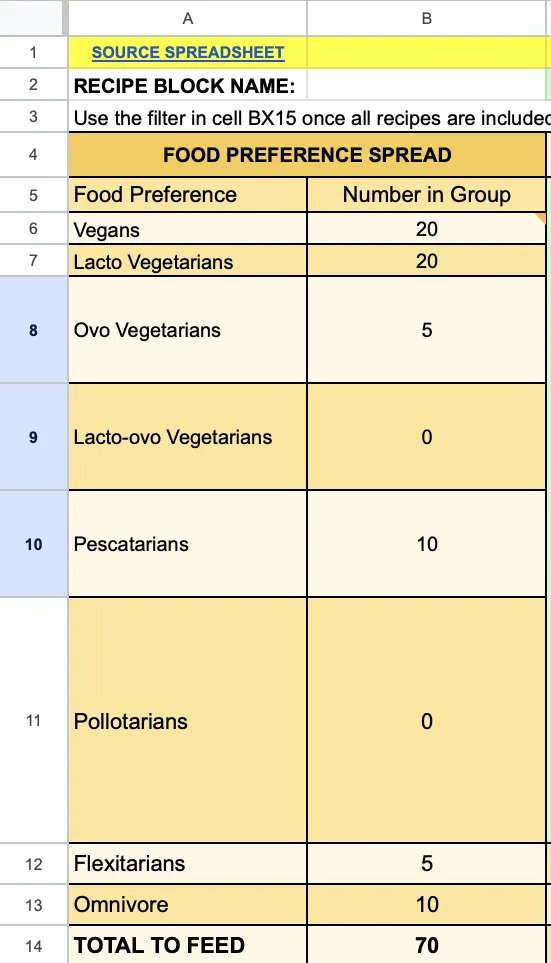 This section displays the number in each dietary group (as entered in your VnOMultipliers sheet), such as Vegans, Lacto Vegetarians, Omnivores, etc.
The tab organizes recipes for Breakfast, Lunch, and Dinner across multiple days, and each meal is tailored for different food preferences.
Group sizes are adjusted in the columns labeled Number in Group, allowing for the appropriate recipe quantities for each group to be calculated.
The goal of this section is to ensure that everyone’s needs are taken into account when planning meals.
It is important to note here that your “TOTAL TO FEED” at the bottom should automatically reflect the sum of the “Number in Group” column.
After resizing, the ingredient amounts will update accordingly to match the total number of servings needed.
RECIPE LINKS AND SIZING
This section allows for easy access to the original recipe and helps users adjust it according to the number of people they are serving.
Each meal (e.g., Breakfast #1, Lunch #1) has a source link to the original recipe and a Re-size the Recipe option.
It’s also possible to filter out ingredients for the Master Shopping List using cell DI15 once all recipes are included. The filter will remove zeros and blanks, condensing the ingredient lists for all recipes.

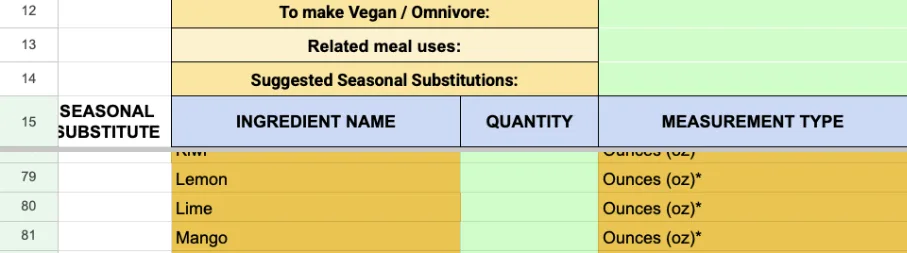
SEASONAL SUBSTITUTIONS
This section allows you to recommend certain ingredients that are more accessible locally or seasonally.
You can input seasonal substitutes for ingredients to account for ingredient availability, which is helpful when adjusting recipes based on local produce (e.g., substituting arugula for spinach).
Write substitutions in ALL CAPS and update the pricing and sizing, so you create a correct master shopping list.
INGREDIENT TRACKING AND COST ESTIMATION
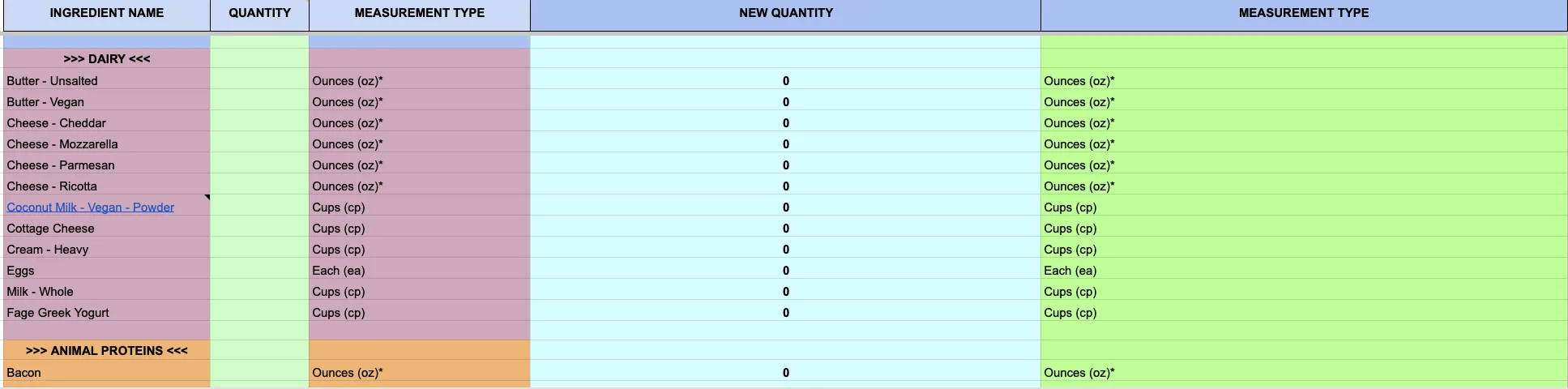
This column helps revise ingredient substitutions and track the estimated total cost for each ingredient.
In the Ingredient Name columns, ingredients are listed with their quantity, measurement type (e.g., ounces, cups), and the new quantity to be used after resizing.
This allows you to calculate the overall cost of the 3-day menu block and estimate the price per meal/person.
TOTAL MEAL COSTS
This section provides an easy way to see the overall cost of the ingredients for the planned meals.
On the right side of the sheet, there is a section for the Estimated Totals for the entire 3-day menu block. On the bottom of this section, there is the Estimated Grand Total.
The totals are calculated based on the ingredients and their adjusted quantities.

Shopping List on MasterRecipe Tab
CREATE A COPY OF THE TRANSITION KITCHEN RECIPE BUILD OUT TOOL
Click the link, then “Make a copy”.
Copy the Recipe Build Out Tool
UPDATE LINKS IN THE FOLLOWING CELLS OF YOUR COPY TO ENSURE FUNCTIONALITY.
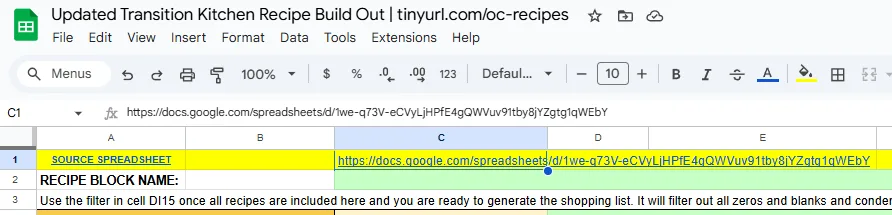
It’s really important to update your links in these areas or the spreadsheet will not work properly. Links need to be updated with a link to your copy of the Master Recipe Template in cell C1 (D1 for shopping lists) on each tab.
On each 3-day recipe tab, select cell C1 (D1 for the shopping lists) and replace the link with the new link to your copy of the Master Recipe Template with the VnOMultipliers sheet.
Verify this is done correctly on each 3-day recipe tab by updating your group’s dietary preferences on your VnOMultiplers sheet, and checking that they update on each tab.
VNO MULTIPLIERS TAB EXPLAINED
The VnOMultipliers tab helps scale ingredients based on the varying food preferences of different dietary groups. By adjusting ingredients according to specific preferences, you can easily create accurate amounts for different groups, whether they are Vegans, Omnivores, or other dietary types like Lacto-Vegetarians, Pescatarians, and Flexitarians. The tab also provides multipliers that allow the recipe to be customized and scaled based on group size and dietary restrictions.

VnOMultipliers tab from Master Recipe Template
VIDEO COMING OF: VNO MULTIPLIERS TAB EXPLAINED
SEE OUR HOW TO HELP AND/OR CROWDFUNDING CAMPAIGN PAGE TO HELP CREATE ALL THE TUTORIAL VIDEOS FASTER
PURPOSE OF THE VNO MULTIPLIERS TAB
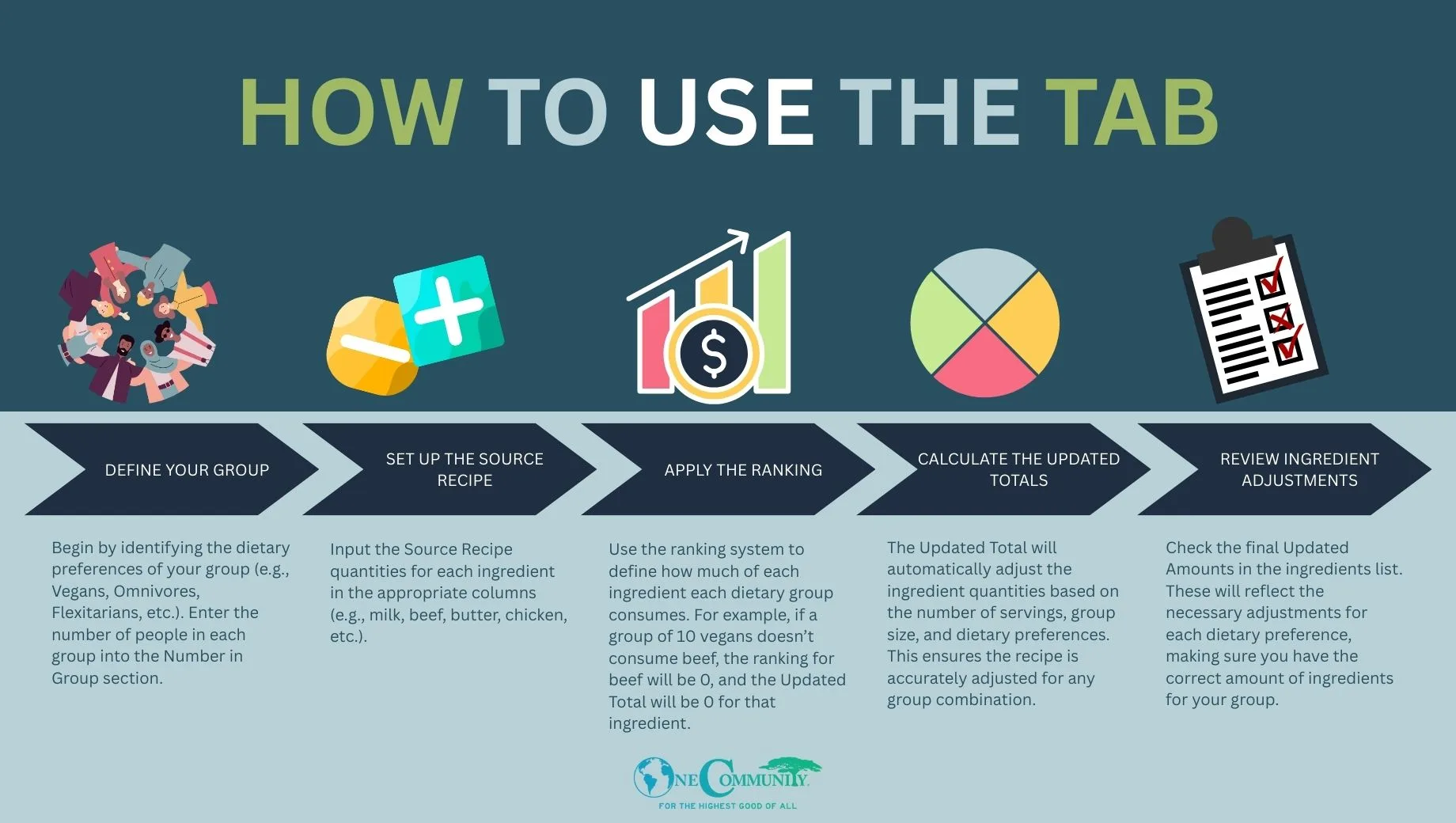
This tab uses Ranking Values and food preference categories to adjust ingredient quantities when scaling recipes for different groups. The calculations help convert the Source Recipe quantities into Updated Totals based on the group composition (e.g., Vegans, Omnivores). These adjustments ensure that ingredients are accurately distributed according to the needs of the group, considering varying levels of consumption of different foods.
RANKING VALUES
Ranking values are used to define how often an individual or group consumes a particular food item. These values help adjust the ingredient quantities based on how frequently a group prefers certain foods.
0: Doesn’t consume
0.125: Occasionally consumes (dabbling)
0.25: Chooses half the time
0.375: Chooses 3/4 of the time
0.5: Chooses the majority of the time (100% of the time for 1 serving)
These rankings are used for each food preference group (e.g., Vegan, Lacto Vegetarian, Omnivore, etc.) to calculate the correct quantities based on their dietary habits.
FOOD PREFERENCE GROUPS
The sheet includes various dietary categories such as:
Vegan (V): No animal products
Lacto Vegetarians: Consumes dairy but no eggs, meat, or fish
Ovo Vegetarians: Consumes eggs but no dairy, meat, or fish
Lacto-Ovo Vegetarians: Consumes both dairy and eggs but no meat or fish
Pescatarians: Eats fish but no other meat
Pollotarians: Eats poultry but no other meat or fish
Flexitarians: Primarily plant-based with occasional consumption of meat
Omnivores: Consumes all types of food (meat, dairy, vegetables, etc.)
The sheet uses rankings specific to each group (for example, Vegans might have a ranking of 0 for beef and 0.5 for vegan proteins) to calculate the adjusted amounts of each ingredient.
The Servings row displays the number of servings for each of the types of food (like beef, chicken, and vegan protein substitutes) based on the dietary preferences and overall population of your group.
NUMBER IN GROUP
Update the Number in Group Column by entering the number of people in each dietary category. The number of people in each dietary group will be used to calculate the number of servings for ingredients specific to different dietary groups.
FOOD INGREDIENTS & SUBSTITUTIONS
The ingredients in the Source Recipe include common items like milk, beef, butter, chicken, cheese, etc. For vegan alternatives, the V Version columns will display substitute ingredients, such as:
Milk Substitute for vegans
Vegan Protein Sub for plant-based proteins
Vegan Cheese Sub and Vegan Butter Sub as dairy replacements
These substitutions will be adjusted based on the group’s dietary needs. For example, if the recipe calls for 2 cups of milk and the group is mostly vegan, the Updated Total will show a higher amount of Milk Substitute.
SOURCE RECIPE AND UPDATED TOTALS
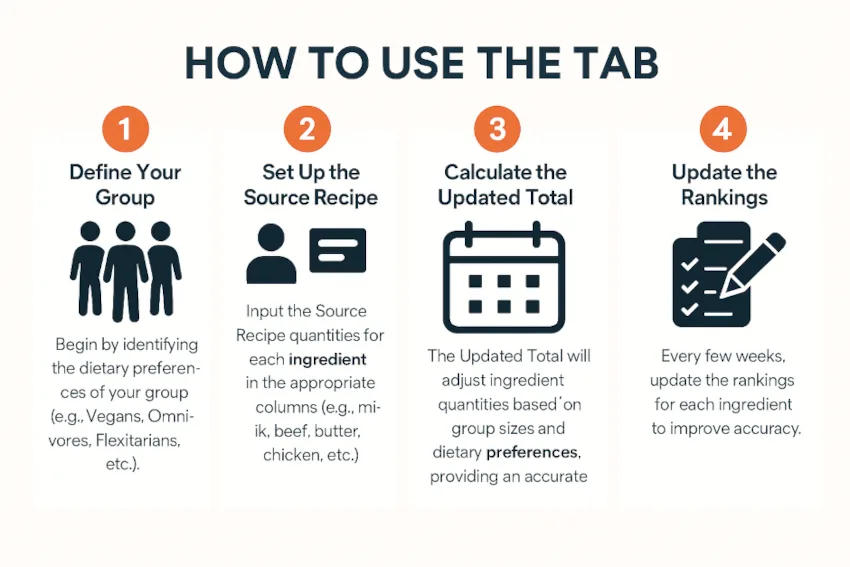
The Source Recipe column and Updated Total column can be used to check calculations, but are not necessary to the function of the tool. Type in the original quantities for a given recipe in the Source Recipe column. The Updated Total column then adjusts these quantities based on the dietary preferences and rankings defined for the group composition.
HOW TO USE THE VNO MULTIPLIERS TAB
HOW TO USE THE VNOMULTIPLIERS TAB
Whether you’re cooking for a small family or a large, self-sustaining group, the Recipe Build-Out Tool offers flexible solutions to help ensure food variety, sufficiency, and sustainability.
Step 1: Update Link to Your Copy
On the ‘MasterRecipe’ sheet, select cell C1 and replace the link with your copy’s link.
Step 2: Input Group Sizes
Enter group sizes by dietary preference in the Master Template.
Step 3: Confirm Recipe Re-sizing
Check the ‘New Quantity’ column to confirm accurate re-sizing.
It may be necessary to adjust the ranking values after several months if a shortage or surplus in any particular type of ingredient is a regular occurrence.
MASTER FOOD COSTS TAB EXPLAINED
This tab is designed to track and manage the costs of ingredients used in your recipes. Each column has a specific purpose to help you organize and estimate ingredient prices efficiently.
COLUMNS
This section describes the columns shown on the Master Food Costs Tab.
NAME
The name of the ingredient (e.g., “Olive Oil”, “Potatoes”) appears in this column. This helps identify the specific food item being tracked. Do not edit this column, as all ingredient names are pulled from column C of the MasterRecipe tab.
WEIGHT
This column should list the total weight of the ingredient (e.g., “16 oz”, “2 lbs”). It reflects the package size or the weight of the product as it is purchased.
UNIT OF WEIGHT
Specify the unit of measurement for the weight in this column (e.g., “oz”, “lbs”, “g”). This ensures clarity on the scale of the ingredient.
PRICE
Enter the total price of the ingredient (e.g., “$4.99”). This is the price paid for the specified weight of the item.
PURCHASED HOW
Describe how the ingredient is purchased in this column (e.g., “16 oz bottle”, “5 lb bag”). This helps clarify the packaging and quantities of the ingredient as sold.
COST (COLUMN C)
Calculate the cost per unit based on the total price and the weight of the item (e.g., cost per ounce, cost per pound), usually this will be the same as the PRICE column. It can help you understand the unit price of each ingredient.
ESTIMATED COST PER UNIT IN COLUMN C
This column is used to calculate totals on the shopping lists. Calculate the cost per unit by dividing the total cost of the item by its total quantity (e.g., per ounce, per gram, per pound). It gives you a clearer picture of how much each unit of an ingredient costs, making it easier to compare prices and manage your budget effectively.
Example: Arugula costs $29.49 for 3 lbs, so divide $29.49 by 3 to get the cost per pound ($9.83/lb), then divide by 16 oz/lb to get the cost per ounce ($0.61/oz).
NEW SUGGESTED MEASUREMENTS
On the spreadsheet, the exact column title is “IF SUGGESTING A MEASUREMENT DIFFERENT THAN COLUMN C, PUT NEW SUGGESTED MEASUREMENT HERE”. If you suggest a different measurement unit for the ingredient than the one used in Column C (e.g., using “cups” instead of “ounces”), enter the new measurement here. This is particularly useful when you want to adjust based on your recipe’s needs.
SOURCE LINK FOR COST
Include a link to the source where the price was found (e.g., an online store or vendor). This ensures the price reference is transparent and traceable for future updates or verifications.
HOW TO USE THIS TAB
This section describes the intended uses for the Master Food Costs Tab. Using this tab properly can help you track and plan ingredient purchases to stay on budget.
TRACK COSTS
Each time you purchase ingredients, update the Name, Weight, Unit of Weight, Price, and Estimated cost per unit in Column C columns to keep the cost information current.
CALCULATE UNIT COSTS
Calculate the cost per unit based on your entries in the previous columns, and record the approximate cost per unit in column G. This column (G) is used to calculate totals on the shopping lists.
SUGGEST MEASUREMENTS
If you prefer a different unit of measurement than the default one used for cost calculation, input the suggested measurement in the relevant column.
VERIFY PRICING
Always link to the source where the cost information is gathered, ensuring that the prices remain accurate and easy to verify. This setup helps ensure your ingredient costs are well-documented, easy to track, and consistent across your recipes.
INSTRUCTIONS FOR CUSTOMIZERS
This tool is primarily designed to help you adapt our diverse, chef-created recipes to suit your dietary needs, preferences, budget, and ingredient availability. By updating the master tab, any substitutions or changes you make—such as swapping out ingredients—will automatically update across all relevant spreadsheets, making customization simple and efficient.
If you choose to use your own recipes instead, the tool can still support your planning. In that case, you can manually add step-by-step directions and images directly into the spreadsheet to make your meal plan even easier to follow.
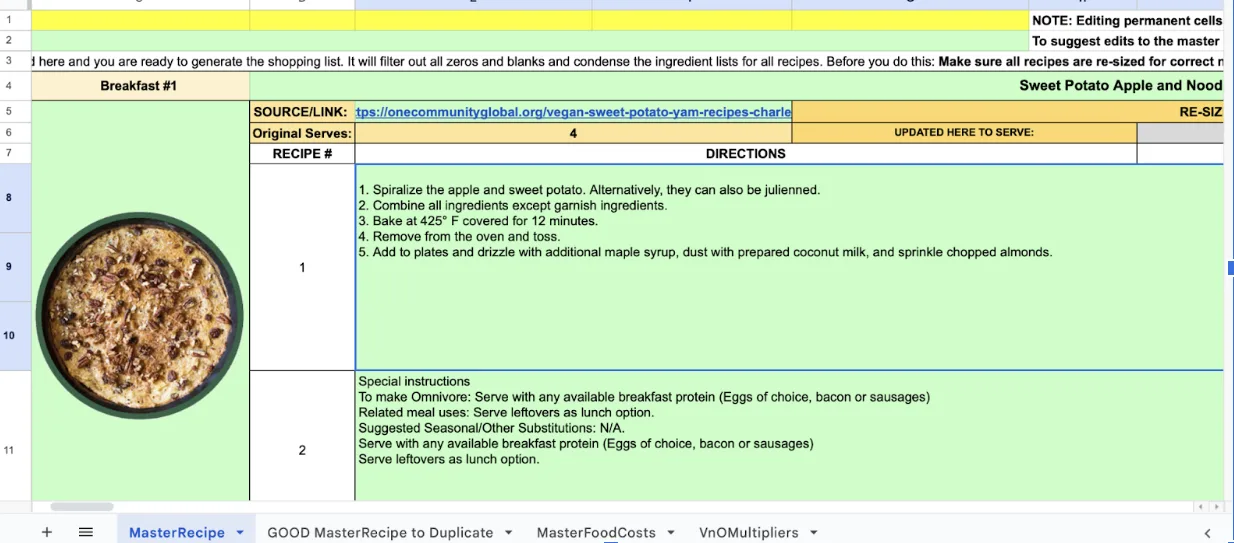
Recipe Build Out Tool
STEP-BY-STEP DIRECTIONS
Each recipe block can include a detailed list of instructions, organized by meal. This provides clarity on how to prepare and cook each dish, making the process smoother for whoever is in charge of cooking. Simply add the directions in the designated area for each meal.
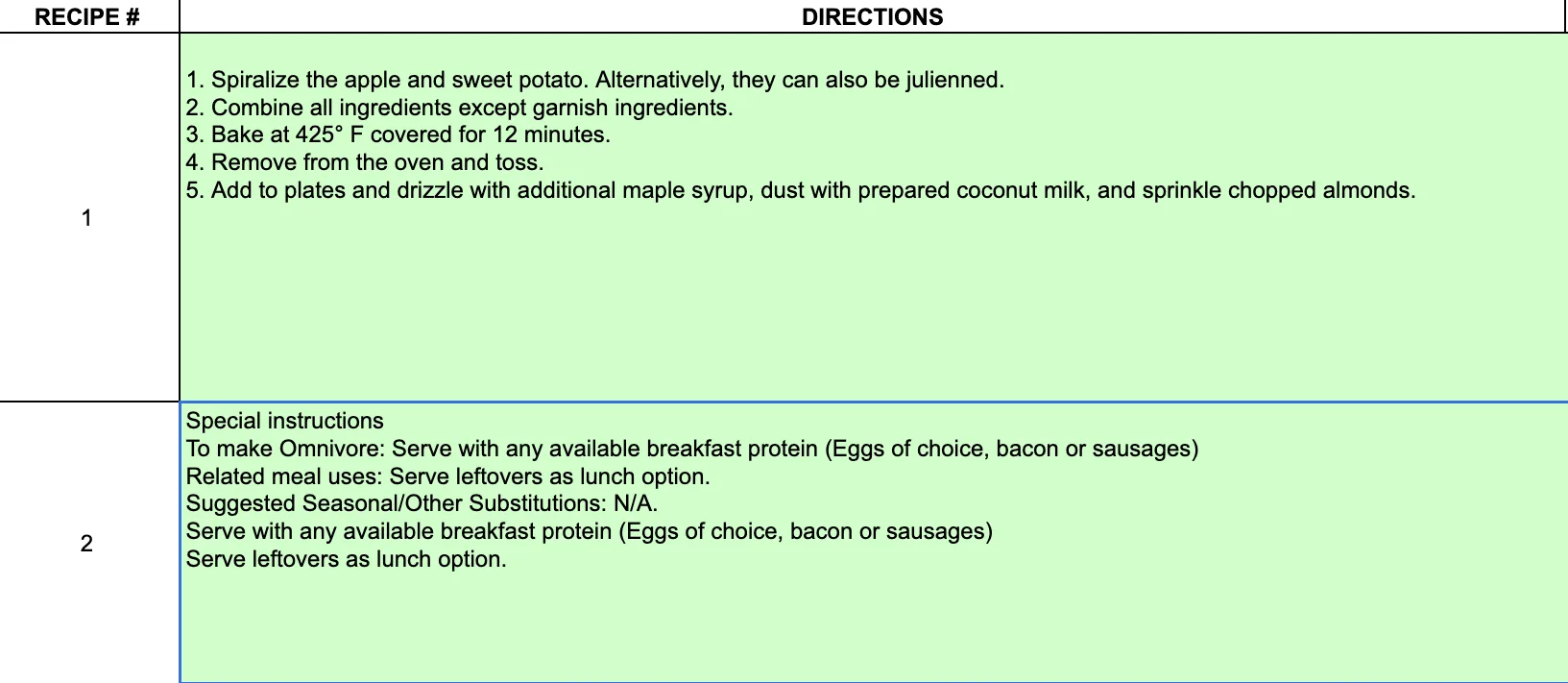
RECIPE PICTURES
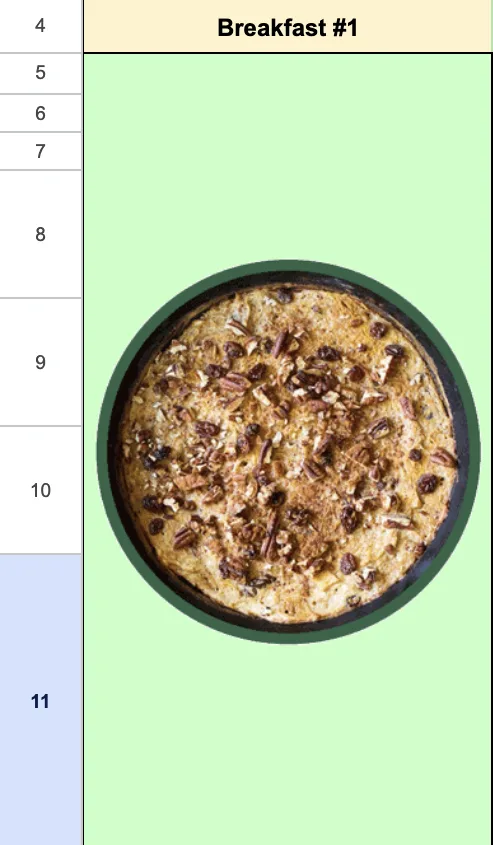 Add pictures to each meal block to visually represent the final dish. This will not only help users visualize the end result but also give them a sense of the portion size and presentation.
You can insert the images in the Recipe Block Name area or beside each individual recipe, depending on your preference.

Recipe Build Out Tool
LINK TO MORE RESOURCES
You can also include external links to video tutorials or more detailed recipe instructions, if necessary, so users can easily access additional guidance.
ORIGINAL SERVINGS
Insert the initial quantity of portions that the original recipe is designed to yield; this information is important for your future calculations.

Recipe Build Out Tool
UPDATED SERVINGS
This option will automatically display the amount of servings a recipe will be adjusted to; it should automatically be linked to the “TOTAL TO FEED” cell. This number should reflect the total number of people in your group.

Recipe Build Out Tool
Including these elements helps ensure that users are not just following the numbers, but also understanding the process and seeing what the meals should look like.
Use the Ingredient Name and Quantity section to input the quantity of each ingredient of your desired recipe; the “New Quantity” column will automatically scale your ingredient measurements to account for the size of your group.
Note: In the “Quantity” column, ensure that you are inputting the amount of ingredients for only one personal serving; therefore, if your original recipe serves 4, you must divide the original ingredient quantities by 4 to find the measurement for a single person
Example: Your original breakfast recipe is intended to serve 4 people and calls for 12 ounces of shredded potatoes; the number you would insert into the quantity column for the ingredient, “Potatoes -Yukon Gold”, would be 3 ounces (12 ounces divided by 4).
🔑 KEY REMINDERS
- Do not edit permanent cells in the first recipe block as it will affect all linked blocks and tabs.
- Use the filter to generate a consolidated shopping list after sizing your recipes.
- Seasonal substitutions can be made to adapt the recipe to available ingredients, but these should be noted for each meal to ensure consistency.
This tab provides an efficient way to manage and scale multiple recipes based on group preferences and sizes while keeping track of ingredient costs. By following the steps above, you can create a comprehensive meal plan and shopping list that caters to a variety of dietary needs.
RESOURCES
- Highest Good Food
- Transition Kitchen Setup
- Food Self-sufficiency Transition Plan
- Sustainable Food Nutrition Calculations
- Food Procurement and Storage
- Recipe Build-Out Tool
- Food Bars
- How to Get All Your Nutrition From Food
- Long Term Storage Techniques
SUMMARY
The Recipe Build-Out Tool is part of the open-source initiative for sustainable living. It simplifies meal planning for small to large groups by adapting recipes based on dietary needs and ingredient availability. Designed as a spreadsheet system, it supports nutritional balance, food variety, and efficiency. The tool is backed by tutorials, integrates with a broader Food Self-Sufficiency Plan, and emphasizes open-source values to promote global accessibility.
FREQUENTLY ANSWERED QUESTIONS
Q: How can you be sure your food ratios are correct?
A: Although much research has been done, we can not be sure that this is going to be the most versatile and complete list that will accommodate the needs and preferences of our team until we are on the property, understand the preferences of each individual, and see how each person’s caloric intake is affected by the labor they engage in. The ratios and items will be adjusted based on these needs, consensus, and the sources and costs of the particular foods that we can access from the property.
Q: Why are so many of the recipes vegan?
A: The vast majority of the preliminary recipes were donated by a vegan chef. We will create omnivore based recipes as well, specifically for the transition kitchen plans, which we anticipate will be used by an even broader audience than just our pioneer team.
Q: Why does the recipe build-out tool come with 2 months’ worth of recipes, and 2 week shopping lists?
A: Our food self sufficiency plan is to have staple and non-perishable foods on a 2 month cycle, and fresh foods on a 2 week cycle to maximize both nutrition and self sufficiency.
Q: Do you have any sustainable kitchen design suggestions?
Yes we do! Visit our Transition Kitchen Setup page for the open source designs and construction plans.
Q: I’m an omnivore or vegan, what if I don’t want to eat a vegan or omnivore diet?
The complete food self-sufficiency transition plan is designed to meet the needs of all dietary preferences through:
- Recipes that can be made vegan or omnivore:
- Vegan recipes were chosen that could easily have animal-based proteins added for omnivores
- Omnivore recipes were chosen that could easily be made with 100% vegan ingredients
- Food bars will be provided alongside the prepared meal to make adaptations available, giving community members the opportunity to eat better than 99.9% of the human population. The combination of a prepared meal and food bar will be like having a personal nutritionist and chef, serving the most diverse, nutritious, and fresh food possible.
Q: How do you intend to produce spices, mill grain for flour, cooking oil, etc. etc.
To us, “100% food sustainability” means we will demonstrate and open source share a model that doesn’t need external food sources. Having achieved this, what we produce internally versus choosing to buy will be decided through the consensus process.
Q: What is One Community’s stance on pesticides, herbicides, and fungicides?
If it is not safe to eat, we will not be spraying it on our food. Here’s a video we feel is helpful in understanding why:
VIDEO COMING OF: PESTICIDES, HERBICIDES, AND FUNGICIDES
SEE OUR HOW TO HELP AND/OR CROWDFUNDING CAMPAIGN PAGE TO HELP CREATE ALL THE TUTORIAL VIDEOS FASTER