One Community
Code Snippets – Internal page
This page is for web designers to have easy access to commonly used code snippets.
It includes the following snipets:
Reminder our Site Map has a similar setup for copy/pasting web pages with the proper meta data included.
VIDEO COMING GRAPHIC
This “Video Coming” graphic should be inserted anywhere you feel a tutorial video would be beneficial. These videos will be shot during our construction process, and this graphic helps the reader know what is coming and us to be sure to plan for a professionally produced video on this topic. Videos can be instructional, time lapse, or any other format you think would be helpful.
Video – Example of properly using the “Video Coming” graphic
WHAT IT SHOULD LOOK LIKE ON THE PAGE


VIDEO COMING OF: XXXX INSERT VIDEO DESCRIPTION XXXXX
SEE OUR HOW TO HELP AND/OR CROWDFUNDING CAMPAIGN PAGE TO HELP CREATE ALL THE TUTORIAL VIDEOS FASTER
CODE TO CREATE THIS
Copy the code below into your “code” tab to create the above graphic. Then edit the details in the “Visual” tab. The “sc name=diy-img” that is an image must be typed out to work.
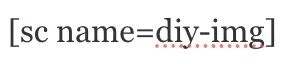
<p style=”text-align: justify;”><span style=”color: #ff6600;”>VIDEO COMING OF: XXXX INSERT VIDEO DESCRIPTION XXXXX</span></p>
<p style=”text-align: justify;”><span style=”color: #ff6600;”>SEE OUR <a title=”One Community is designed so everyone has an option to participate. These options range from internet participation only to Pioneers moving to the property and more. Click here for the page listing everything that is available. ” href=”https://onecommunityglobal.org/helping/”>HOW TO HELP</a> AND/OR <a title=”Earthbag and Aircrete Dome Home Crowdfunding Campaign – One Community” href=”https://onecommunityglobal.org/earthbag-and-aircrete-dome-home-crowdfunding/”>CROWDFUNDING CAMPAIGN PAGE</a> TO HELP CREATE <em>ALL</em> THE TUTORIAL VIDEOS FASTER</span></p>
SAFETY ICON
Use this icon on the left of any area that could be a safety concern. It should be formatted just like it is here. Write at least 2.5 lines of text when using this icon, so the text fills the same or more lines as the image.
Video – Proper placement of the Important Safety Icon
WHAT IT SHOULD LOOK LIKE ON THE PAGE
 As per the Occupational Safety and Health Administration (OSHA), Personal Protective Equipment (PPE) is required for the safety of all personnel on the team. Additionally, fences and signage are required to demarcate the dangerous work areas on site. If a trench is created (OSHA defines a trench as a “narrow underground excavation that is deeper than it is wide, and not wider than 15 feet”) additional safety precautions will be followed according to OSHA’s Trench and Excavation Safety published information.
CODE TO CREATE THIS
Copy the code below into your “code” tab to create the above graphic. Then edit the details in the “Visual” tab:
<img class=”alignleft” style=”margin: 3px 5px 0px 0px; border: 0px solid black;” title=”important-safety-note_RED_100x100″ src=”https://onecommunityglobal.org/wp-content/uploads/2021/03/important-safety-note_RED_100x100.png” alt=”Important safety note, warning, caution, take note, One Community Global, open source icon” width=”50″ height=”50″ />
NEXT GRAPHIC SETUP FOR THIS PAGE
NEXT GRAPHIC
This is for use on THIS page…
WHAT IT SHOULD LOOK LIKE ON THE PAGE
Example Image
CODE TO CREATE THIS
Copy the code below into your “code” tab to create the above graphic. Then edit the details in the “Visual” tab:
<add code here>